Husky
Husky
1.认识 Husky
1.前提
1 | 1.使用husky电脑必须安装git. |
2. 集成 editorconfig 配置
EditorConfig 有助于为不同 IDE 编辑器上处理同一项目的多个开发人员维护一致的编码风格。
1 | # http://editorconfig.org |
- VSCode 需要安装一个插件:EditorConfig for VS Code

3. 使用 prettier 工具
Prettier 是一款强大的代码格式化工具,支持 JavaScript、TypeScript、CSS、SCSS、Less、JSX、Angular、Vue、GraphQL、JSON、Markdown 等语言,基本上前端能用到的文件格式它都可以搞定,是当下最流行的代码格式化工具。
1.安装 prettier
1 | npm install prettier -D |
2.配置.prettierrc 文件:
- useTabs:使用 tab 缩进还是空格缩进,选择 false;
- tabWidth:tab 是空格的情况下,是几个空格,选择 2 个;
- printWidth:当行字符的长度,推荐 80,也有人喜欢 100 或者 120;
- singleQuote:使用单引号还是双引号,选择 true,使用单引号;
- trailingComma:在多行输入的尾逗号是否添加,设置为
none,比如对象类型的最后一个属性后面是否加一个,; - semi:语句末尾是否要加分号,默认值 true,选择 false 表示不加;
1 | { |
3.创建.prettierignore 忽略文件
1 | /dist/* |
4.VSCode 需要安装 prettier 的插件
5.测试 prettier 是否生效
- 测试一:在代码中保存代码;
- 测试二:配置一次性修改的命令;
在 package.json 中配置一个 scripts:
1 | "prettier": "prettier --write ." |
4. 使用 ESLint 检测
1.在前面创建项目的时候,我们就选择了 ESLint,所以 Vue 会默认帮助我们配置需要的 ESLint 环境。
2.VSCode 需要安装 ESLint 插件
3.解决 eslint 和 prettier 冲突的问题:
安装插件:(vue 在创建项目时,如果选择 prettier,那么这两个插件会自动安装)
1 | npm install eslint-plugin-prettier eslint-config-prettier -D |
添加 prettier 插件:
1 | extends: [ |
4.VSCode 中 eslint 的配置
1 | "eslint.lintTask.enable": true, |
5.git Husky 和 eslint
1.虽然我们已经要求项目使用 eslint 了,但是不能保证组员提交代码之前都将 eslint 中的问题解决掉了,也就是我们希望保证代码仓库中的代码都是符合 eslint 规范的;
2.那么我们需要在组员执行 git commit 命令的时候对其进行校验,如果不符合 eslint 规范,那么自动通过规范进行修复;
那么如何做到这一点呢?可以通过 Husky 工具
3.husky 是一个 git hook 工具,可以帮助我们触发 git 提交的各个阶段:pre-commit、commit-msg、pre-push
1 | 安装: npx husky-init && npm install 有些电脑需要这样写 npx husky-init '&&' npm install |
1 | 1.安装husky相关的依赖: |

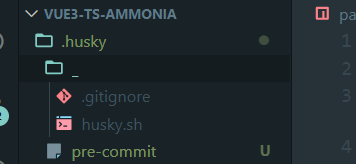
1 | 2.自动在项目目录下创建 `.husky` 文件夹: |
1 | 3.自动在package.json中添加一个脚本: |

1 | 4.接下来,我们需要去完成一个操作:在进行git commit -m ' ' 时,执行lint脚本: |

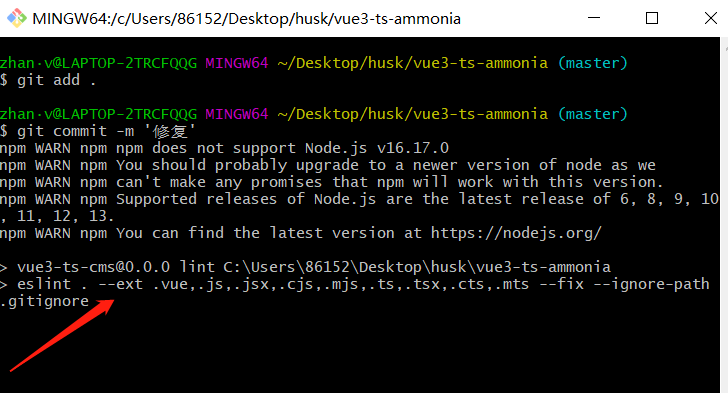
1 | 5.出现这行即表示成功。在执行commit时,会自动执行npm run lint这行校验代码。帮助你去修复不规范的代码。 |